
Startup guide · Chapter 3 of 13
Wages and labour law settings
Check the PF, ESI and bonus rates, add your state’s minimum wages, and switch on PT and LWF where they apply.
About 20 minutesChecked against the app 30 October 2026
On this page
Before you start
- The latest minimum wage notification for each state where you have a site: Basic and DA per day for Unskilled, Semi-skilled, Skilled and Highly skilled.
- Professional Tax slabs and LWF rates for those states (if they have PT / LWF). Your CA can confirm them.
- The skill category of each type of worker you employ (helper, fitter, welder and so on).
Step 1: ThekaFlow starts with the legal defaults
A new company starts compliant: OT at 2×, an 8-hour day, PF 12%, ESI rounded up, and PT and LWF switched on. You can change any setting. If a change goes below the law, ThekaFlow asks for a reason (see the last step).
Step 2: Check the rates in Statutory & salary
Open Settings → Statutory & salary. Six rates are already filled:
- Bonus 8.33% · Leave 5.77% · Gratuity 4.85% of Basic.
- PF 12% and PF maximum per month ₹3,000 (12% of the ₹25,000 ceiling).
- ESI (employee) 0.75%.
- To change one, click Change…, enter the New value, the Effective from month and a Note, then Save new rate. Old payrolls are never rewritten.
The law:PF: 12% from the worker and 12% from the employerPF wage ceiling is ₹25,000 from 17 September 2026ESI: 0.75% from the worker and 3.25% from the employerBonus: at least 8.33%, at most 20%
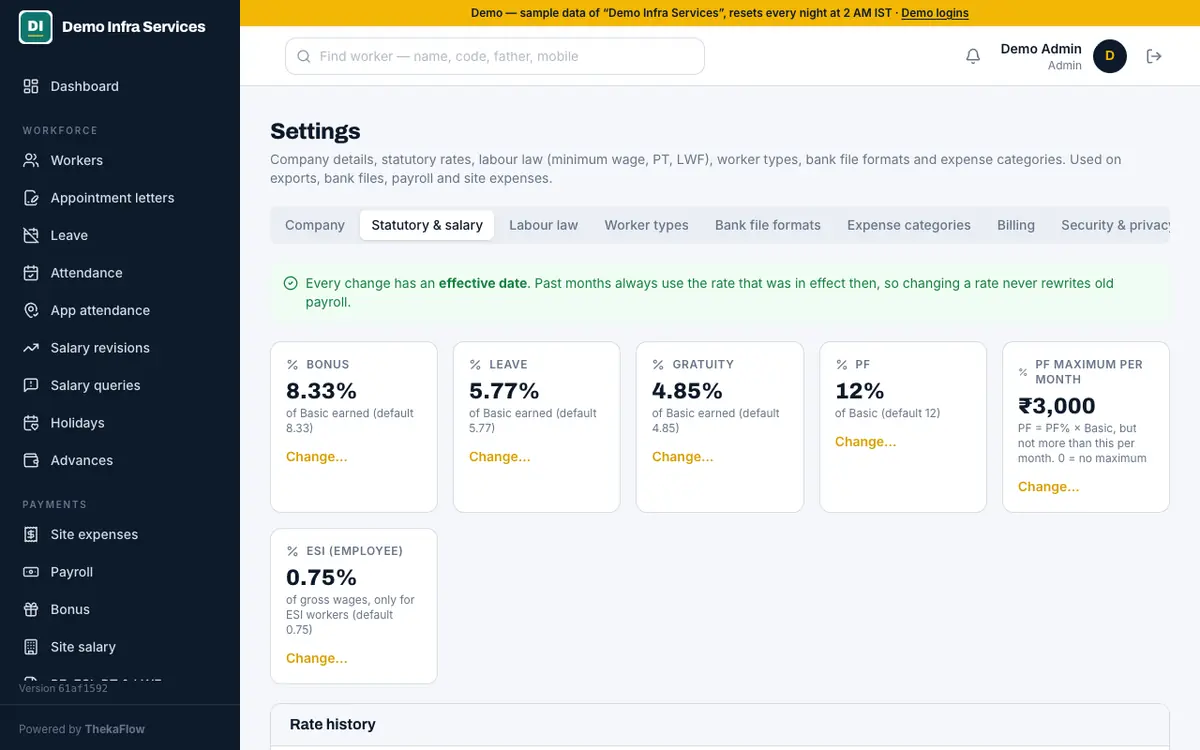
Settings → Statutory & salary. Each card has a “Change…” link. Tap to enlarge. Step 3: Set the Labour law options
Open the Labour law tab. In Options check the switches, then click Save options:
- ESI: round up to the next rupee — on.
- ESI auto-coverage — on. Workers earning up to ₹21,000 come into ESI on ESI-notified sites.
- Deduct Professional Tax and Deduct LWF — on. They only deduct in states where you add slabs or rules below.
- Maximum total deductions (% of wages) — 50.
The law:Round each ESI share up to the next rupeeCover every worker earning up to ₹21,000Deduct Professional Tax where the state levies itDeduct and pay Labour Welfare Fund where the state levies itKeep total deductions within 50% of wages
Step 4: Add the minimum wages
The Minimum wages table is empty for a new company. Click + Add and fill State, Effective from, Skill category, Basic per day (₹) and DA per day (₹). ThekaFlow shows the total per day.
Add one row for each skill category in each state where you work. Payroll then warns you if any worker is paid below it.
The law:Keep the state minimum wage table up to datePay at least the minimum wage
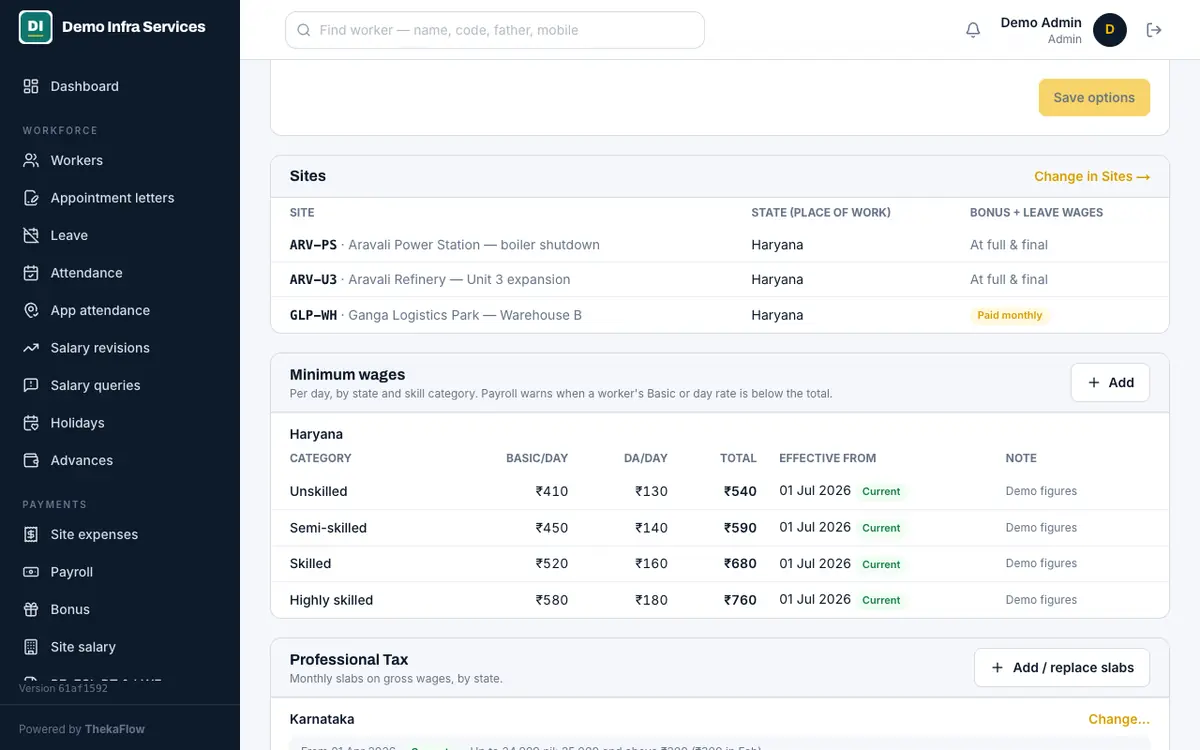
Settings → Labour law → Minimum wages (demo figures). Tap to enlarge. Step 5: Add Professional Tax slabs
Only for states that have PT (for example Maharashtra, Karnataka, West Bengal). Click Add / replace slabs, choose the State and Effective from, then click Load suggested where it is offered. Check every row (For, Gross from, To, PT, In Feb) with your CA before saving.
Step 6: Add Labour Welfare Fund rules
Click Add rule, choose the State and Effective from, then Load suggested or fill: Months (for example 6,12), the Employee amount (₹ or % with a maximum) and the Employer amount (₹ or a multiple of the employee share).
The law:Deduct and pay Labour Welfare Fund where the state levies it
Step 7: Check your worker types
Open the Worker types tab. Each type (Unskilled, Skilled, Fitter …) has a Skill category and a Basic per day. Basic per day is the statutory wage on registers, and the rate on client bills.
Click Add worker type to add one (Name, Code, Skill category). Click Change Basic… to set the Basic for all sites or for one site, from a date.
Step 8: Where overtime is set
Overtime is not on these tabs. It is set per site (OT multiplier, default 2×) and can be changed per worker. See Sites.
Step 9: If you set something below the law
When a change is below the law, ThekaFlow shows This does not follow the law, the rule, and a Read in rule book link. You can still save: write a Reason (at least 5 characters) and click Save anyway. Your name and the date are saved with it, and the item stays on the Law compliance page until it is fixed.
Some things can never be saved, such as a worker below 14 years of age.
Tips and common mistakes
- Minimum wages change twice a year in most states (DA from 1 April and 1 October). Add a new row with the new date — don’t edit the old one.
- The state of each site decides which minimum wage, PT and LWF apply — not your head office.
- Basic + DA must itself reach the minimum. A big “allowance” does not count.
- Read the Minimum wages and PT & LWF chapters of the rule book for the numbers.
हिंदी में
- Settings → Statutory & salary में PF 12%, ESI 0.75%, बोनस 8.33% पहले से भरे हैं।
- Labour law टैब में अपने राज्य की न्यूनतम मज़दूरी (Basic + DA) जोड़ें।
- जिस राज्य में PT / LWF है, वहाँ की slabs जोड़ें — CA से मिलान करें।
- Worker types में हर तरह के मज़दूर की skill category और Basic देखें।
- क़ानून से कम कुछ रखा तो कारण लिखना पड़ेगा — वह Law compliance पेज पर दिखेगा।
Read next