
Startup guide · Chapter 2 of 13
Company details
Fill your company’s registration numbers, address, logo, grievance officer and the bank account salaries are paid from.
About 10 minutesChecked against the app 30 October 2026
On this page
Before you start
- GST certificate (GSTIN) and PAN of the company.
- PF establishment code, ESIC employer code (17 digits) and LIN (Shram Suvidha), if you have them.
- Registered address with PIN code.
- Company logo as JPG, PNG or WEBP (up to 2 MB).
- Bank account number and IFSC of the account you pay salaries from.
- The name, phone and email of the person who answers workers’ questions about their data (grievance officer). Often the owner or the HR person.
Step 1: Open Settings → Company
In the left menu click Settings. The first tab is Company.
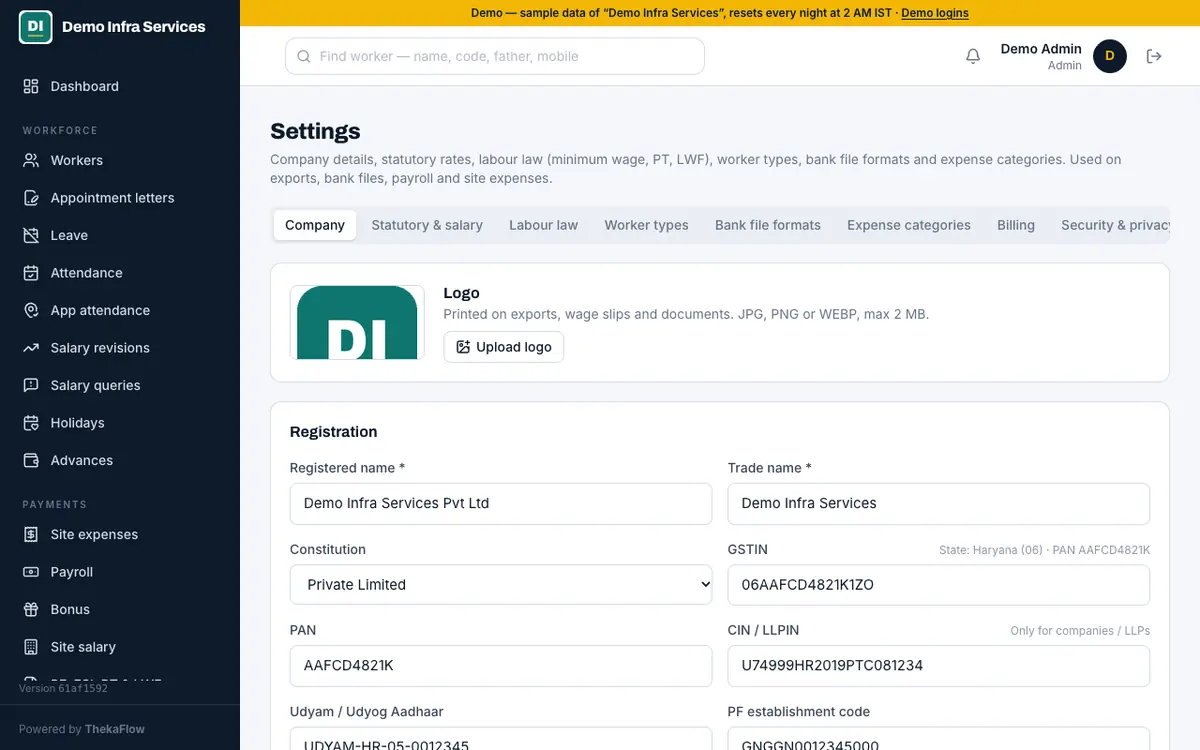
Settings → Company. Tap to enlarge. Step 2: Upload your logo
Click Upload logo and choose the file. It saves at once. The logo is printed on salary slips, exports, ID cards and bills.
Step 3: Fill the registration numbers
- Registered name and Trade name (both required).
- Constitution — Proprietorship, Partnership firm, LLP, Private Limited and so on.
- GSTIN — ThekaFlow reads the state and PAN from it. The PAN must match the GSTIN.
- CIN / LLPIN — only for companies and LLPs. Udyam / Udyog Aadhaar if you have it.
- PF establishment code, ESIC employer code (17 digits) and LIN — these print on registers, slips and PF / ESI files.
Step 4: Address and contact
Fill Address (required), State, PIN code, Contact mobile, Contact email and Website. The state must be the same as the state in your GSTIN.
A site set to “Same as company” uses this state for minimum wage, PT and LWF.
Step 5: Name a grievance officer
Under Grievance officer (worker data) fill Name, Phone and Email. This person is printed on the privacy notice every worker sees. Without it, the Law compliance page shows a gap.
Step 6: Add the company bank account
Under Payment bank (debit account) fill Account number and IFSC. The bank name fills itself. This is the account salaries and advances are paid from. ThekaFlow puts it in every bank file, so the bank file cannot be made without it.
Step 7: Save
Click Save company details. If a field is wrong (for example PAN not matching GSTIN), ThekaFlow shows the problem next to that field.
Tips and common mistakes
- A new self-signup company has only its name filled. The Address is empty and must be filled before you can save.
- Check the GSTIN carefully. A tax invoice to your client cannot be made without it.
- Use the exact registered name from the GST certificate. It prints on every register and bill.
हिंदी में
- मेन्यू में Settings → Company खोलें।
- लोगो अपलोड करें, कंपनी का नाम, GSTIN, PAN भरें।
- PF कोड, ESIC कोड (17 अंक) और LIN भरें।
- पता, राज्य और शिकायत अधिकारी (grievance officer) का नाम-फ़ोन भरें।
- जिस बैंक खाते से सैलरी जाती है, उसका नंबर और IFSC भरें, फिर Save दबाएँ।
Read next